Multi-Tenancy
Activation
In order to activate multi-tenancy on an instance, a specific license must be used. Contact the Evertrust team for access.
| Multi-tenancy must be enabled when provisioning a new instance, and cannot be disabled afterwards. This means that switching an instance between multi-tenancy modes is not possible. |
Tenant isolation
Horizon uses logical isolation, meaning that a single database is used for all tenants of an instance.
To discriminate between tenants, Horizon uses the x-tenant header.
Using a header allows for a highly customizable tenant access model.
It should be enabled on the reverse proxy.
No x-tenant header means that Horizon will load the root tenant context
|
Here is an example architecture:
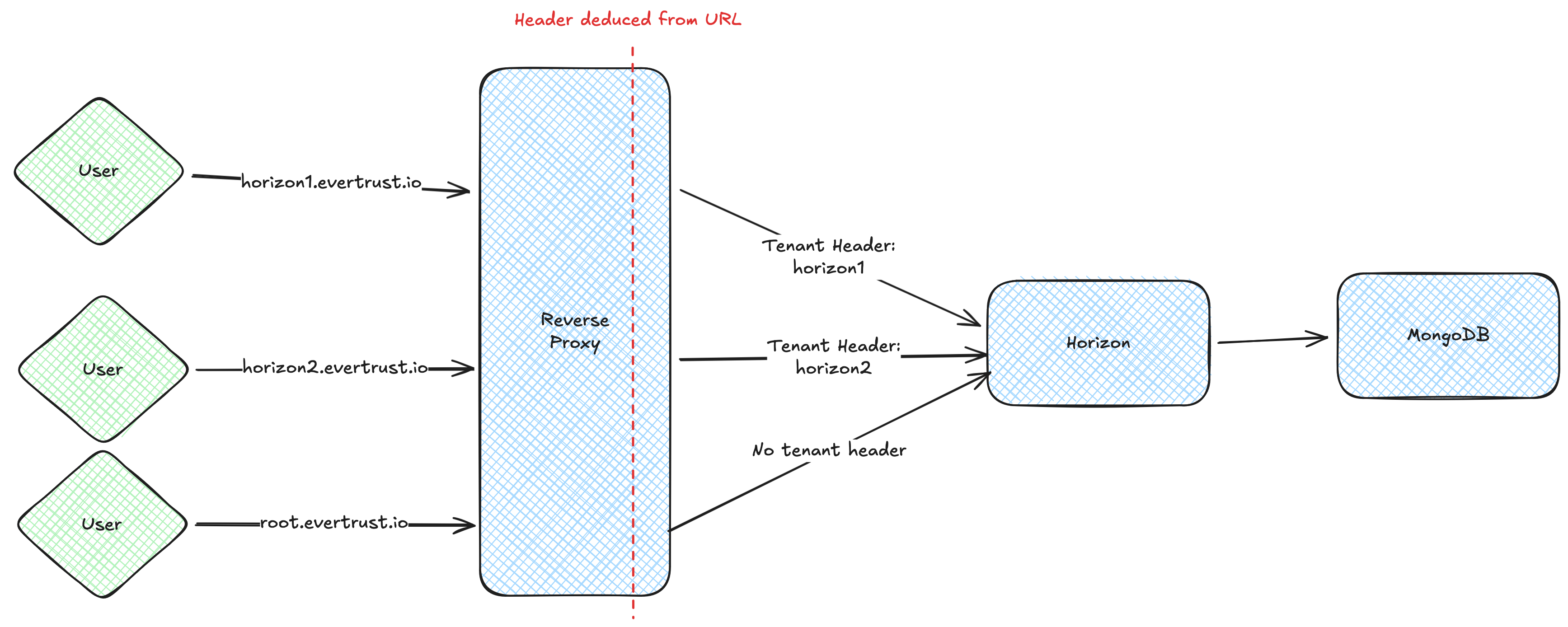
In this architecture, the content of the x-tenant header is set by the reverse proxy based on the prefix before the evertrust.io domain, with a specific rule for the root domain.
Root tenant
The root tenant is the base tenant of a multi-tenant instance. It has limited capabilities, mostly linked to user and tenant management.
| The root tenant cannot access any of its tenant data, and can only manage tenants, not their data. |
Tenant management
For tenant management, please refer to the Administration Guide
Specific configuration
On a multi-tenant instance, some system queues are shared across tenants. If the instance sees heavy usage, the following parameters should be altered:
-
The CRL cache synchronization parallelism and size
-
The CRL database synchronization parallelism and size
-
The default PKI queue parallelism and size
Secrets
On a multi-tenant instance, secrets for a tenant (credentials, private keys, …) are encrypted using its own Tink keyset. This keyset is itself encrypted with the instance keyset. This ensures secrets are completely isolated from one tenant to another.
Logging
On a multi-tenant instance, the tenant information can be added to logs.
-
RPM
-
Debian
-
Kubernetes
The tenant information is already added to standard logs if you are using the JSON or SYSLOG encoder.
If you are using the standard line format, you can add the tenant information using the %contextTag{tenant} keyword anywhere in the pattern.
To edit the pattern, follow the standard steps.
The tenant information is already added to standard logs if you are using the JSON or SYSLOG encoder.
If you are using the standard line format, you can add the tenant information using the %contextTag{tenant} keyword anywhere in the pattern.
To edit the pattern, follow the standard steps.
The tenant information is already added to standard logs if you are using the json format.
However, if you are using the json_events logger, the tenant information is not added by default.
To add it, one must modify the contents of the /horizon/etc/logback.xml file.
The following modification should be applied to the contents of the json_events appender:
<pattern>
    {
        "event": "#asJson{%message}",
        "tenant": "%contextTag{tenant}", (1)
        "type": "event"
    }
</pattern>| 1 | This line adds the tenant key to the JSON event logs, and outputs an empty string when no tenant is linked to this event. |